Lorem ipsum dolor sit amet, consectetur adipiscing elit. Ut elit tellus, luctus nec ullamcorper mattis, pulvinar dapibus leo.

Beginner’s Guide to Campaign Tracking:
How to Measure What’s Actually Working in Your Marketing
If you have ever posted on social media, sent an email, or shared a link and then thought, “Okay… but did that actually do anything?” you are definitely not the only one. You show up online, you try different things, and you hope something works. But without tracking, it’s almost impossible to tell what is actually making a difference.
That’s why campaign tracking matters. It gives you clarity. It shows you what is working, what is not, and where your time and energy are actually paying off. According to HubSpot Campaign Tracking Guide, campaign tracking is the practice of gathering and analyzing data to understand how your marketing efforts are performing. DigGrowth also explains that campaign tracking helps marketers measure the impact of their efforts on the KPIs that matter. A KPI, also known as a key performance indicator, is just a measurable way to track progress toward a goal.
Source: HubSpot Campaign Tracking Guide https://blog.hubspot.com/marketing/campaign-tracking
Source: DigGrowth: What Is Campaign Tracking https://diggrowth.com/marketing-analytics/what-is-campaign-tracking/
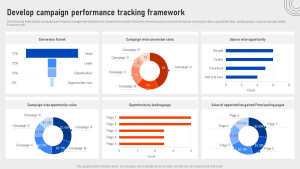
What Campaign Tracking Actually Means
Campaign tracking is a way to measure how your marketing is performing. It connects your actions, like posting on Instagram or sending an email, to real results. Camphouse Analytics describes it as tagging marketing touchpoints and collecting interaction data to measure
In everyday language, campaign tracking tells you what is working so you can stop guessing.
Without tracking, you are throwing content into the void. With tracking, you can see what is actually happening and make smarter decisions because of it.
Why Campaign Tracking Matters for Beginners
A lot of small businesses skip tracking because it sounds complicated. The truth is that it is one of the easiest ways to save time and stop spinning your wheels.
Here is why it matters:
You stop wasting time on things that do not work
You learn which platforms bring in the most traffic
You can compare campaigns and see which ones perform best
You get clarity instead of confusion
You make decisions based on data instead of feelings
When you understand what is working, you can confidently do more of it. When something is not working, you can adjust before wasting time or money.
Different Ways to Track Your Campaigns
You do not need to use every method. Start with one and build from there.
1. UTMs
UTMs are one of the most common ways to track campaigns. They are small tags you add to the end of a link so tools like Google Analytics can read them.
A UTM link might look like this::
https://yourwebsite.com?utm_source=instagram&utm_medium=social&utm_campaign=winter_sale
It looks complicated, but it is really just a labeled link. When someone clicks it, you know exactly where they came from. Google’s free UTM builder is helpful if you are new to this.
External link: Google Campaign URL Builder (ga-dev-tools.web.app in Bing)
2. Platform Analytics
Most platforms already give you built in analytics:
-
Instagram Insights
-
Facebook and Meta Business Suite
-
TikTok Analytics
-
Pinterest Analytics
-
YouTube Studio
These tools show reach, clicks, views, and engagement. They do not replace UTMs, but they help you understand what is happening on each platform.
3. Google Analytics
Google Analytics gives you the full picture. You can see:
-
Where your traffic came from
-
Which campaigns brought people to your site
-
What people did once they got there
-
Which campaigns led to conversions
If you want a deeper breakdown of why analytics matter, I talk about it here: Internal link: Why Hire a Digital Marketer for Your Brand?
You can also learn more directly from Google’s documentation. External link: Google Analytics Help Center
4. Link Tracking Tools
Tools like Bitly or Rebrandly let you shorten links and track clicks. They are simple and beginner friendly.
External links: Bitly Rebrandly
How to Set Up Campaign Tracking
You do not need advanced skills to do this. Here is the easiest way to get started.
Step 1: Choose What You Want to Track
Pick one campaign to start with. For example:
-
A new blog post
-
A sale
-
A product launch
-
A newsletter
-
A social media promotion
Step 2: Create a UTM Link
Use a free UTM builder and add:
-
Source, which is where the link is shared
-
Medium, which is the type of traffic
-
Campaign, which is the name of your campaign
External link: Google Campaign URL Builder (ga-dev-tools.web.app in Bing)
Step 3: Use the Link Everywhere for That Campaign
If you are promoting a blog post on Instagram, Facebook, and email, use a different UTM link for each one. That way, you will know which platform brought the most traffic.
Step 4: Check Your Data in Google Analytics
In GA4, you will find campaign data under:
-
Reports then Acquisition then Traffic Acquisition
-
Reports then Acquisition then User Acquisition
-
Reports then Advertising then Campaigns
Google’s documentation explains these reports in more detail.
External link: GA4 Acquisition Reports (support.google.com in Bing)
Common Beginner Mistakes
These mistakes are very common, but they are easy to avoid.
1. Inconsistent Naming
If you name one campaign spring_sale and another SpringSale, Google Analytics will treat them as two different campaigns. Keep your naming consistent.
2. Over Tagging
You do not need UTMs on every link. Only use them for campaigns you want to measure.
3. Using UTMs on Internal Links
Never use UTMs on links inside your own website. It breaks your data.
4. Forgetting to Check Your Data
Tracking only works if you actually look at the results. Set a weekly reminder.
How Campaign Tracking Improves Your Marketing Strategy
Campaign tracking helps you:
Identify your top performing platforms
Understand your audience’s behavior
Improve your content strategy
Spend your time more wisely
Make decisions based on real data
When you understand what is working, you can confidently do more of it. When something is not working, you can adjust quickly.
Final Thoughts
If campaign tracking feels overwhelming, you are not alone. I used to feel the same way. Once you understand the basics, it becomes one of the most empowering parts of marketing. Start small. Track one campaign. Look at the data. Learn from it. Then track the next one.
Marketing does not have to be guesswork. With campaign tracking, you can finally see what is actually working, and that is where real growth begins.